
Article
Designing Systems for High Availability
This blog explores the engineering principles and strategic trade-offs behind building resilient systems that withstand failure, from redundancy patterns and graceful degradation to cost-aware SLOs. It argues that true high availability isn't about preventing every crash but ensuring users never notice when failures occur.
- Topic
- Technology
- Published
- 31 Mar 2026

It's 3 AM on a Friday. Your payment processing system crashes. Customers face walls when it comes to finishing their purchase. Thus, the revenue is leaking out. Support tickets are coming in so quickly that the team can't keep up with reading them. By the time it's morning, you have already lost $250,000 in sales and your customers' trust, which took you years to build, is broken.
However, this is not a hypothetical scenario. According to Uptime Institute's research, almost three-quarters of organizations, 73% experienced an outage incident last year which cost them more than $100, 000. In fact, for B2B SaaS platforms, marketing tech stacks, and customer, facing services, downtime ceased being an IT headache around 2015 and has become a boardroom issue affecting revenue, damaging reputation, and pushing customers to competitors.
Making a system resistant to errors by allowing it to continue functioning in spite of component failures isn't just some competition to achieve "five nines" because it will look good on a slide deck. It's more about making wise compromises, getting to know what fails and why, and developing systems that don't stop functioning when certain parts break.
What High Availability Actually Means
Teams, even experienced ones, get this wrong very often. Correctly defining these terms will help you avoid poor planning and unhappy stakeholders.
Availability versus reliability
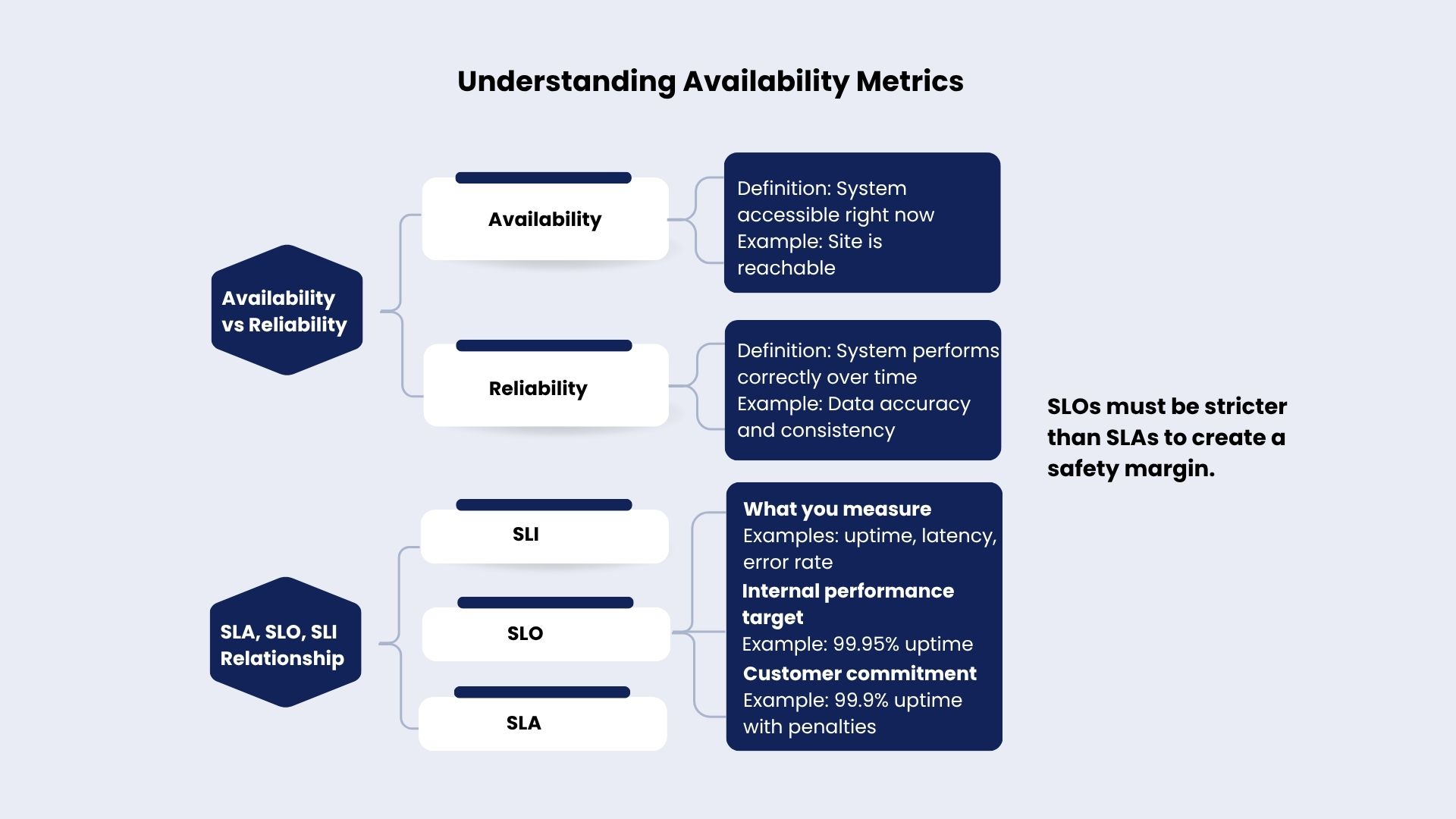
These terms get mixed up constantly, but they're actually gauging different aspects. Availability considers: Are users able to get to the system at this moment?
Reliability questions: Is the system consistently performing its function correctly over time without breaking down?
There are systems out there that never go down but deliver wrong data. So, they are highly available but totally unreliable. Or systems that perform flawlessly when they are up but get their services interrupted twice a week. So, they are super reliable but have terrible availability. You need both to work well together, but each one demands its own engineering approach.
SLAs, SLOs, and SLIs
Today, availability discussion revolves around three main points.
Service Level Indicators (SLIs) decide what you are measuring: request success rates, latency numbers, error percentages.
Service Level Objectives (SLOs) are internal performance target setters. For example, the objective might be to get 99.9 availability percent.
Service Level Agreements (SLAs) are those promises written in contracts with real money coming into play if you miss them.
The key is: Your SLO must be stricter than your SLA. So, if you promise your customers a 99.9 percent uptime, then the internal target should be 99.95 percent. That margin of safety gives the team some time to troubleshoot before refunding customers.
Interpreting the Numbers That Matter
Let's figure out the actual downtime that these percentages refer to.
At 99.9 percent uptime, downtime of approximately 8.76 hours is allowed per year, or 44 minutes every month. Suppose you run an e, commerce platform that makes $10, 000 hourly, then $87, 600 might be your potential lost sales every year.
If you raise to four nines (99.99 percent) then the downtime a year could be as low as 53 minutes. Five nines (99.999 percent) would imply that you have only 5 minutes of downtime a year. Adding each nine not only causes a slight increase in the cost, but the amount that you have to pay will also be more than double. Good teams come up with their service level objectives (SLOs) which are more customer oriented than service level agreements (SLAs) as SLOs determine engineering decisions even before customers complain. Reflecting availability targets to the impact of the business is the right thing to do, i.e., not to your ego.
Redundancy and Failover Strategies
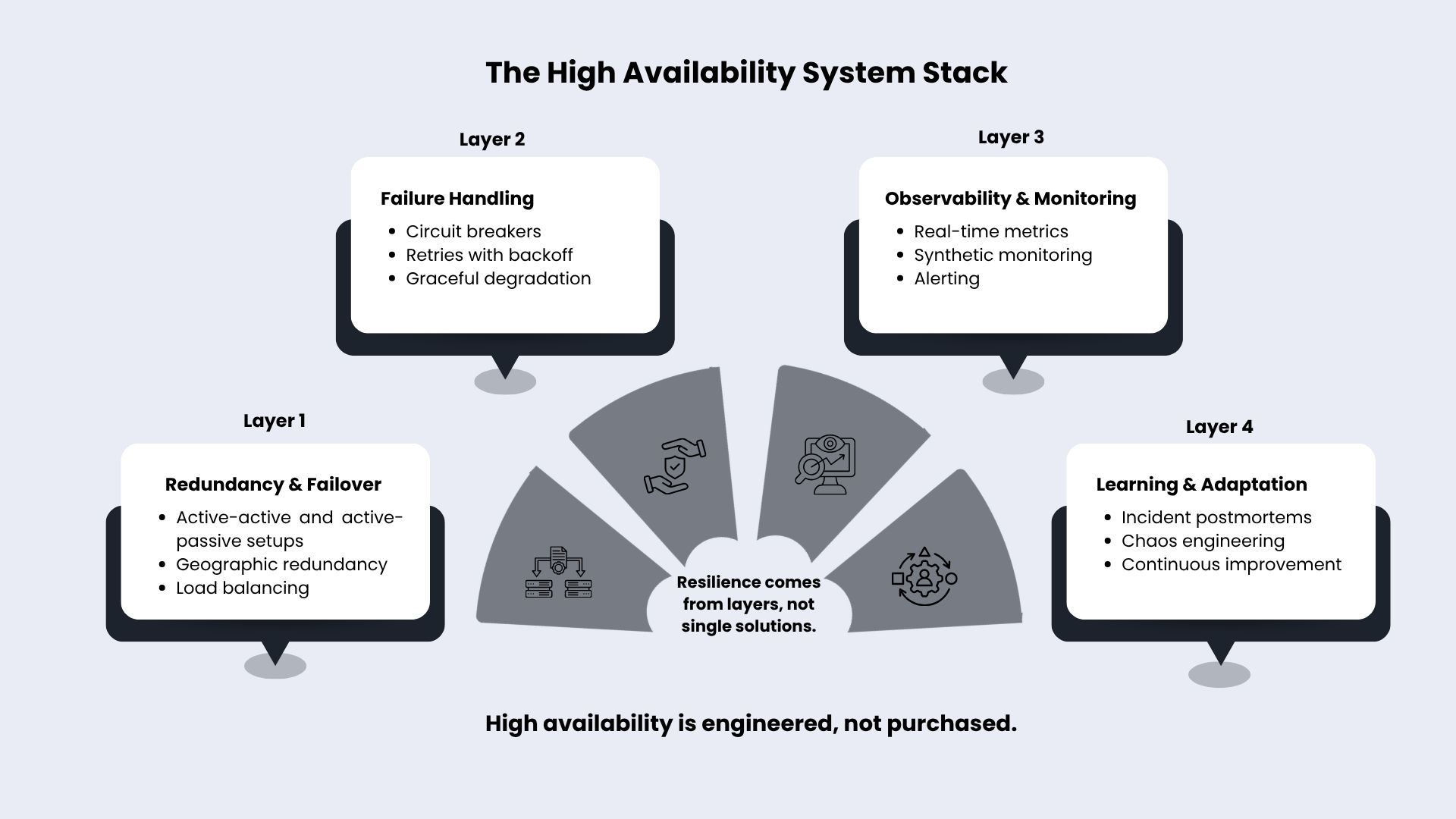
Redundancy is the backbone of a solid system. How you design it determines whether your system keeps running or falls apart.
Active-active versus active-passive
n an active‑active setup, all nodes share the work. So, if one fails, the others immediately take over, and users never notice anything went wrong. Active, active setups feature rapid failover and smart resource utilization. The drawback is that apps must be designed for operations in a distributed environment, data synchronization becomes a challenge, and you're essentially fixing conflict resolution that didn't occur before.
Active-passive means one instance handles everything while backups sit idle on standby. Simpler to design, easier to manage state. But failovers take longer, and you're burning budget on servers doing nothing. Banks and healthcare systems often go this route because having one authoritative data source matters more than squeezing efficiency from every server.
Geographic redundancy
Put everything in one region and you're begging for a disaster. Power dies, networks partition, entire cloud regions go dark. It is natural for such things to occur. Geographically distributed deployments diversify risk, confine failure to a single region, and minimize latency to users globally by serving them from local data centers.
When you have live instances functioning in more than one data center or availability zone, a regional outage won't be enough to bring down your entire service. Although on the flip side, you've just made your system more complex: synchronizing data between continents, facing replication latency, incurring higher operational expenses. Achieving high availability always involves giving up simplicity in exchange for resilience.
Load balancing approaches
Load balancers act as your system's traffic cops. Simple round-robin just cycles through servers without caring how busy they are. Least connections routing sends requests to whichever server is handling the fewest active connections, which works better when traffic comes in uneven waves.
Smart load balancing watches server health constantly, yanking failed instances out of rotation before users see errors. Advanced setups weight distribution by server capacity, route geographically for speed, and maintain session affinity so users don't lose their state. Mess up your load balancer config and you've wasted every other availability investment you made.
Handling Failures Gracefully
Failures will definitely happen. What separates good systems from disasters is how they handle those failures.
Circuit breakers and retries
Retries catch temporary hiccups, but dumb retry logic makes outages worse. Circuit breakers watch your calls to external services and track how often they fail. When failures cross a threshold, the circuit "trips" and stops sending traffic to the dying service, giving it time to recover. After a pause, it cautiously verifies if the service has resumed before it allows the next wave of users.
Make retries in a proper manner: increase the waiting time between each attempt by the factor of two (exponential backoff), limit the number of retries so that you do not get into an infinite loop, and utilize circuit breakers to cease attacking those services that are evidently down. By adding random jitter to retries, you avoid a situation where every client hits the service again at the exact same time and accidentally knocks it over.
Graceful degradation
Some features are more important than others. Graceful degradation allows the main functions to continue operating, first getting rid of the non, essential features, and still gives the users something instead of nothing. If the recommendation engine of an e, commerce site fails; simply disable personalized suggestions, display popular generic items, and keep the checkout working. If video platform bandwidth is tight, lower the video quality rather than not playing anything at all. Availability is about keeping things going, not making everything perfect.
Chaos engineering
Chaos engineering is the practice of deliberately breaking your own systems to see if they really can withstand failures. Simulate instance crashes, inject network delays, kill dependencies, and then observe the results. Rather than waiting for production to get messed up and reveal your weak points, you discover them yourself in controlled experiments.
Companies that run chaos engineering experiments reduce the cost of their incidents three to five times within a year by identifying and resolving issues before real users get affected. The takeaway here is harsh but straightforward: In case you never test failure scenarios, it is most likely that your system won't be able to deal with them when the situation arises.
Monitoring and Incident Response
You can’t fix a problem if you don’t know it exists.
Detecting outages quickly
High availability needs real-time monitoring, metrics that track actual user experience beyond just infrastructure stats, and synthetic monitoring that pretends to be users clicking through your system. Checking server health every 5 minutes was fine in 2010. Now you need metrics streaming continuously and tracing to spot bottlenecks across your microservices maze. How fast you detect problems directly controls how long users suffer.
Managing alert fatigue
Drowning teams in alerts doesn't help anyone. Send 500 alerts daily and your team learns to ignore them, missing the critical ones buried in noise. Good alerting targets actionable problems, ties alerts to SLO breaches, and filters out low-impact nonsense.
Set alerts at 80 percent of your SLO threshold. Targeting 99.9 percent uptime with 44 minutes monthly budget? Alert when any region burns through 5 minutes of issues, giving your ops team time to shift traffic before you're violating SLAs. Alerts nobody trusts are worse than no alerts at all.
Incident postmortems
Failures are your lessons. A powerful postmortem is one that avoids blaming people, instead, it looks at systemic causes and also comes up with clear actions. Great postmortems go beyond the quick fixes such as a "server ran out of memory" and consider why your capacity planning was not prepared for the traffic spikes during product launches.
Systems get better if you see incidents as feedback loops, not as reasons for punishing people. Disseminate your learning to other teams so they can also be spared.
Balancing Cost and Availability
Every nine you add to your availability costs real money.
Diminishing returns hit hard
Going from 99.9 to 99.99 percent usually increases your cost by 3 to 5 times. If you want to go to 99.999 percent, multiply again by 3 to 5.
Costs are not scaling linearly because of an increase in complexity. You are essentially constructing totally redundant systems, operating multiple data centers, having instant failovers, and employing teams to monitor dashboards 24/7.
Even Google struggles here. Their senior VP of operations admitted, "We don't believe five nines is attainable in a commercial service, if measured correctly."
Budget-driven decisions
Match your availability design with a real business impact: consider revenue loss for each minute of downtime, what customers demand and what the regulators require.
For instance, an e-commerce platform that is making $500, 000 daily is essentially losing a little over $21 per minute of downtime. At 99.9% uptime with 44 minutes down per month, you are exposing yourself to losses of $920 per month. If getting to 99.99 percent uptime will cost you an extra $5, 000 per month, the math proves it right.
Internal tools used 9-to-5 don't need the same availability as customer-facing payment systems. Marketing analytics dashboards do fine at 99 percent. Payment processing better hit 99.99 percent or higher.
Right-sizing availability goals
Right‑sizing means choosing SLOs that actually make sense, planning for the kinds of failures you’re truly likely to face, and investing where downtime genuinely hurts. It’s not about how high you can push the numbers.
The question is how much availability your business actually needs. High availability isn’t a default setting. It’s a conscious decision based on what your system really needs.
Designing Systems That Endure
Simply choosing the right cloud provider or architecture pattern cannot guarantee high availability. It is rather a matter of clearly defining acceptable downtime, implementing clever redundancy and failover, being able to handle failures gracefully, constantly monitoring and learning, and making informed decisions between cost and resilience.
Systems that can withstand the most are not the ones that never fail. Successful systems fail in a predictable way, recover quickly, and maintain users' trust. In fact, in today's digital era, availability is not just an engineering metric any longer. It has become a part of customer experience and a way of differentiating one from competitors.
First, figure out SLOs (service level objectives) according to the impact on users and the costs to business. Use redundancy smartly: multiple copies of a system running in parallel (active, active mode) for the user, facing services, active, passive mode if the budget is tight. Set up the observability systems before the emergency arrives. Performing chaos engineering allows you to demonstrate that your system can bounce back from unexpected breakdowns (resilience) without customers finding out the weak spots of your system.
You aren't pushing for a total failure prevention. Instead, you're guaranteeing that when failures occur, which they inevitably will, your users won't be aware of them.